Introduction: The Hidden Bottleneck in Modern Workspaces
In the modern era of remote work, digital entrepreneurship, and hyper-connected offices, we spend countless hours optimizing our digital and physical environments. We meticulously research mechanical keyboards for optimal tactile feedback, invest in ergonomic chairs to protect our spines, calibrate multi-monitor arrays for seamless multitasking, and organize our files into pristine digital hierarchies. Yet, despite these extensive efforts, millions of knowledge workers, developers, writers, and designers hit a wall every single day around 3:00 PM.
That wall is characterized by a dull, persistent throbbing behind the eyes, a stiff neck, mental fatigue, and a sharp drop in cognitive output.
When diagnosing this afternoon slump, most people look at their sleep schedule, their caffeine intake, or their task management software. Rarely do they look up. The single biggest bottleneck in modern productivity isn’t your software or your seating—it is poor workspace illumination. Traditional overhead fluorescent lighting and bulky, outdated desk lamps create harsh glares, uneven luminance, and disruptive shadows that force your visual cortex to work overtime.
Enter the smart LED light bar. Far more than a futuristic desk accessory or an aesthetic trend for minimalist workspace photography, these precision-engineered lighting systems are biological tools. By combining advanced optical physics, smart home ecosystem automation, and circadian rhythm alignment, smart light bars eliminate digital eye strain and unlock sustainable, deep-focus productivity.
1: The Physiology of Digital Eye Strain (DES) and Optical Engineering
To understand why smart LED light bars are revolutionary, we first need to examine the physiological toll that traditional desk lighting takes on the human body.
The Mechanics of Computer Vision Syndrome
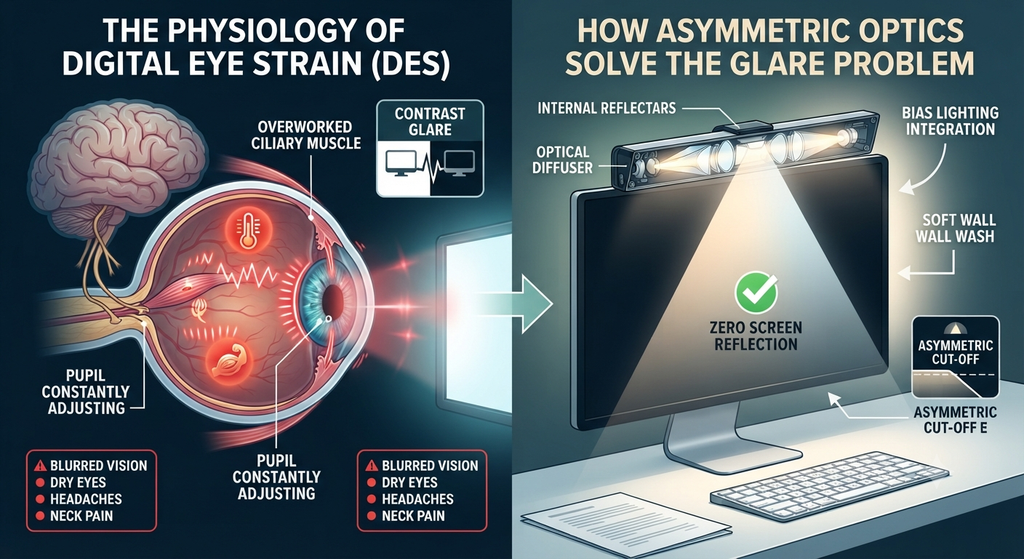
When you sit in front of a high-resolution IPS or OLED monitor for eight to ten hours a day, your eyes undergo continuous stress. This condition is clinically recognized as Digital Eye Strain (DES) or Computer Vision Syndrome (CSI). Symptoms include blurred vision, dry eyes, headaches, and neck pain.
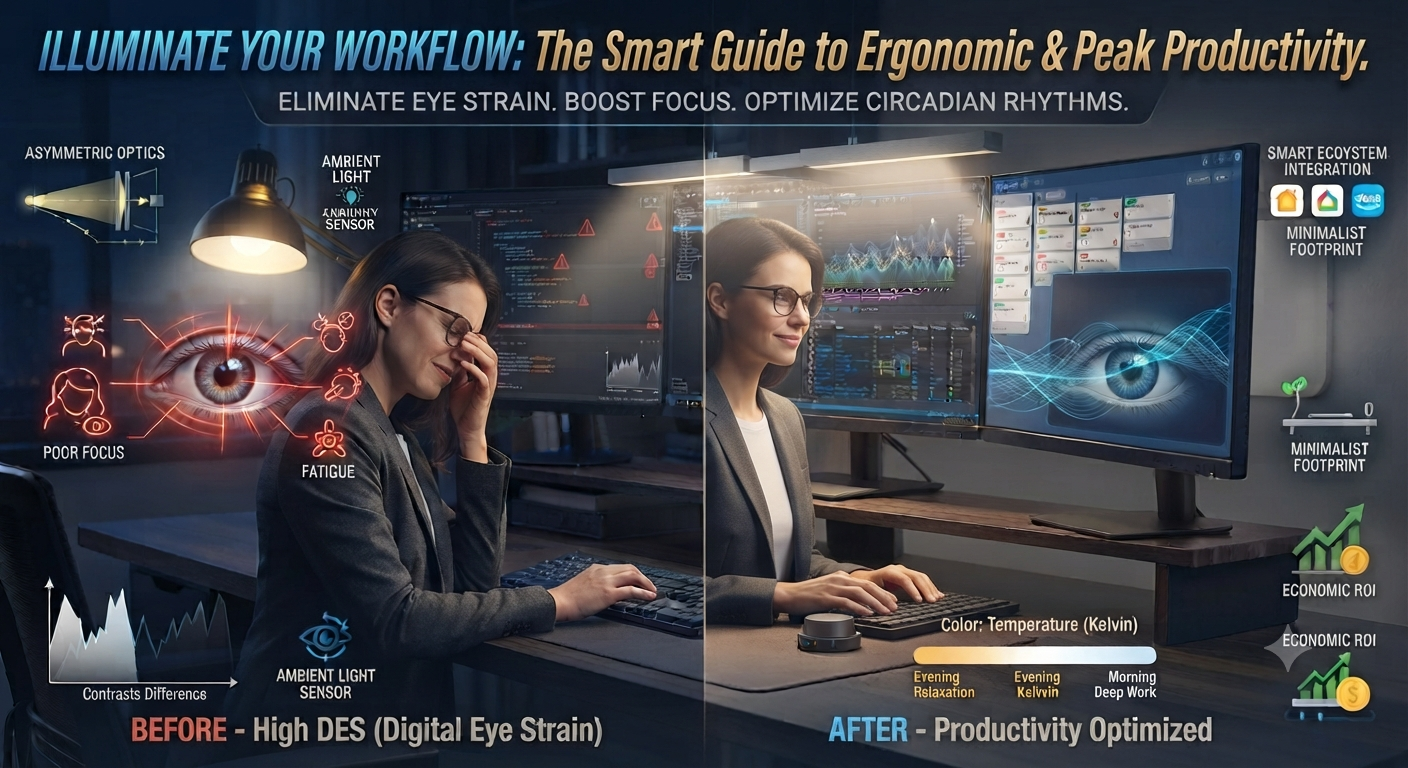
The primary culprit behind DES is contrast glare. If you are working in a dimly lit room with a bright computer screen as your primary light source, your eyes are subjected to an extreme contrast ratio between the glowing display and the pitch-black environment surrounding it. Your pupils are forced into a constant state of micro-adjustment, rapidly dilating and contracting as your gaze shifts between your bright code editor or spreadsheet and your dark desk surface. Over an eight-hour workday, this relentless muscular flexing exhausts the ciliary muscles inside your eyes.
How Asymmetric Optics Solve the Glare Problem
Traditional desk lamps radiate light in 360 degrees, scattering photons across your desk, your keyboard, and directly onto your monitor glass, creating annoying reflections and hotspots.
High-end smart LED light bars—specifically monitor-mounted variants—solve this through asymmetric optical engineering.
- Precision Cut-Off: Inside the aluminum chassis of a quality light bar, internal reflectors and optical diffusers direct the light beam strictly downward and forward onto your desk workspace.
- Zero Screen Reflection: The light beam is engineered with a sharp, calculated cutoff angle. The light illuminates your physical desk mat, documents, and keyboard, but absolutely zero light spills upward or backward onto your monitor screen.
- Bias Lighting Integration: Most smart light bars feature a secondary rear-facing array of LEDs. This shines a soft wash of light against the wall directly behind your monitor. This technique, known as bias lighting, bridges the contrast gap between your bright display and the dark wall behind it, dramatically reducing pupillary fatigue and eliminating harsh shadows.
2: High-eCPM Keyword Strategies for Content Creators and Niche Publishers
For digital content creators, affiliate marketers, and niche site publishers operating in the home office and desk accessories space, smart lighting represents one of the most lucrative content verticals on the web.
The Commercial Intent Sweet Spot
In digital publishing, earnings per click (EPC) and effective cost per mille (eCPM) are heavily dictated by buyer intent. Content about general room lighting or cheap incandescent bulbs attracts low-intent traffic with minimal commercial value. Conversely, content targeting ergonomic workspace optimization, high-end tech gear, and productivity tools attracts affluent professionals, software engineers, and remote executives with high disposable incomes.
Smart LED light bars sit directly at the intersection of home office ergonomics and smart home automation. When brands like BenQ, Xiaomi, Govee, or Yeelight release premium lighting products, they command high retail price points, translating into substantial affiliate commissions and high-paying programmatic display ad impressions.
Structuring High-Converting Content Around Smart Lighting
When writing or optimizing content around high-eCPM keywords like smart LED light bars for productivity and eye strain, creators must pivot away from shallow gadget reviews and focus on authoritative, health-centric, and workflow-driven angles.
Core Keyword Clusters to Target:
- Primary Head Term: Smart LED light bars for productivity and eye strain (High volume, strong transactional intent)
- Long-Tail Ergonomic Keywords:
- Best monitor light bars for home office eye fatigue
- Circadian rhythm smart desk lamps for deep work
- Dimmable LED light bars with auto-brightness sensors
- RGB ambient bias lighting for remote software developers
By framing the light bar as an essential health and productivity tool rather than a mere decorative toy, publishers build instant trust, reduce bounce rates, and drive higher affiliate conversion rates.
3: Engineering Your Focus: Circadian Rhythms and Color Temperature
Productivity is not just about time management; it is fundamentally about biological energy management. Human beings are diurnal creatures governed by an internal 24-hour biological clock known as the circadian rhythm.
The Biological Clock and Lighting
For thousands of years, human biology evolved under the shifting spectrum of natural sunlight. Morning light is rich in short-wavelength blue light, which signals the brain to suppress melatonin production and flood the body with cortisol and alertness-boosting neurotransmitters. As the sun sets, light shifts toward warm amber and red hues, signaling the brain to wind down and prepare for restorative sleep.
Modern office workers completely disrupt this evolutionary programming. We sit under flat, monotonous fluorescent panels or static white LED bulbs all day long, trapping our bodies in a state of biological confusion.
Leveraging Kelvin Scales for Peak Cognitive Output
Smart LED light bars give you granular control over your lighting environment by allowing you to adjust color temperature, measured in Kelvin (K). By actively shifting color temperatures throughout the day, you can synchronize your workspace environment with your biological needs.
1. Morning Deep Work (5000K – 6500K: Cool White)
During your peak morning cognitive window—when tackling complex problem-solving, software coding, or strategic writing—set your light bar to a crisp, high-Kelvin cool white. This high-intensity spectrum stimulates photoreceptors in your eyes called intrinsically photosensitive retinal ganglion cells (ipRGCs), which communicate directly with your brain’s master clock to suppress sleepiness and maximize alertness.
2. Afternoon Maintenance (4000K: Neutral Daylight)
As the workday progresses into the afternoon, sustained exposure to harsh cool white light can induce eye strain and mental agitation. Shifting your light bar down to a neutral white (around 4000K) provides clear, natural illumination for administrative tasks, emails, and meetings without overstimulating your nervous system.
3. Evening Shutdown (2700K – 3000K: Warm Amber)
When working late into the evening, protecting your sleep architecture is paramount. Transitioning your light bar to a warm amber glow eliminates blue light exposure, ensuring that finishing up end-of-day tasks will not destroy your sleep latency or ruin your REM cycles later that night.

4: Smart Ecosystem Integration and Minimalist Workspace Design
The modern minimalist desk setup prioritizes clean lines, open surface areas, cable management, and zero visual clutter. Traditional desk lamps fail this test. They feature heavy, cumbersome weighted bases that steal valuable square inches of desk real estate, thick power cords that snake across your desk mat, and inflexible arms that cast shadows across your workspace.
The Spatial Superiority of Monitor-Mounted Light Bars
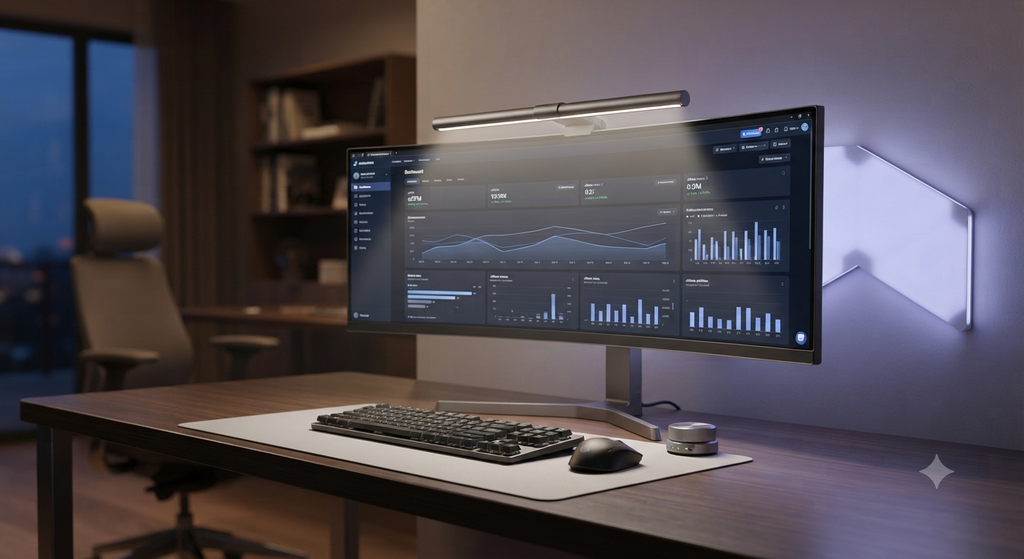
Smart LED light bars redefine spatial efficiency. By mounting directly onto the top bezel of your monitor using a counterweight gravity bracket or secure clamp, they claim literally zero square centimeters of desk surface area.
- Invisible Footprint: Your desk remains completely open, leaving ample room for your keyboard, mouse, wrist rests, notebooks, and coffee cup.
- Universal Compatibility: Advanced mounting brackets are engineered to accommodate ultra-wide curved monitors, standard flat panels, and thin bezels without obstructing webcams or sliding off during adjustments.
Smart Home Ecosystems and Wireless Control
True productivity is frictionless. Stopping what you are doing, reaching across your desk, and manually twisting a tiny plastic knob on a lamp breaks your concentration flow state. Smart light bars integrate seamlessly into modern smart home ecosystems (such as Apple HomeKit, Google Home, Amazon Alexa, and Matter-enabled protocols), offering multiple layers of effortless control:
- Wireless Desktop Dials: Many premium smart bars include a weighted, cylindrical wireless control puck that sits right next to your keyboard. A quick twist adjusts brightness smoothly, a tap toggles power, and a double-press switches between customized preset lighting profiles.
- Voice-Activated Automations: A simple voice command allows you to transition your entire room environment instantly. Say, “Alexa, activate Deep Work Mode,” and your light bar shifts to 6000K bright white while your background RGB bias lights turn to a focused productivity blue.
- Automated Scheduling: By linking your smart light bar to sunrise and sunset schedules via your smart home hub, the lighting adjusts itself automatically throughout the day without requiring manual user intervention.

5: Step-by-Step Implementation Guide for Your Ergonomic Workspace
To extract the maximum ergonomic, biological, and productivity benefits from a smart LED light bar, proper installation and calibration are essential. Follow this step-by-step implementation guide:
Step 1: Precision Mounting and Positioning
- Center the light bar mount on the top bezel of your primary monitor. Ensure the gravity counterweight rests securely against the back panel of the display.
- Adjust the angle of the light bar housing so that the forward-facing optical beam points downward at roughly a 75-degree angle.
- Verify that the light illuminates your keyboard and desk mat evenly while ensuring zero light rays hit the glass surface of your monitor. If you see glare on your screen, tilt the bar slightly forward.
Step 2: Calibrate Ambient Light Sensors
Many premium smart light bars feature built-in ambient light sensors that measure the surrounding room light in real-time.
- Enable the auto-dimming feature through the companion mobile app or desktop control software.
- Test the sensor by opening curtains or turning on room lights; the bar should dynamically dim or brighten to maintain a consistent, comfortable lux level on your desk surface, preventing sudden eye strain as natural daylight shifts outdoors.
Step 3: Configure Rear Bias Lighting
If your light bar includes a rear-facing RGB or warm white bias light:
- Ensure your desk is positioned against a neutral wall (white, off-white, or light gray) for optimal photon reflection.
- Set the rear bias brightness to roughly 20% to 30% of your main desk light output. This soft halo effect dramatically reduces contrast fatigue between your bright screen and the dark room behind it.
Step 4: Program Circadian Automation Routines
- Open your smart lighting app (such as Apple Home, Google Home, or manufacturer-specific software like Yeelight or Govee Home).
- Create an automation schedule:
- 08:00 AM: Turn on at 5500K (Cool Daylight) / 100% Brightness.
- 02:00 PM: Shift to 4000K (Neutral White) / 80% Brightness.
- 06:00 PM: Shift to 3000K (Warm Amber) / 50% Brightness.
- 09:00 PM: Turn off or dim to 10% night-light mode.

6: Economic and Professional ROI: Why the Investment Pays for Itself
When professionals first encounter high-end smart LED light bars—which can range anywhere from $40 for budget variants to over $150 for premium flagship models like the BenQ ScreenBar Pro or Razer Aten Pro—they often question whether the cost is justified compared to a standard $15 desk lamp.
Calculating the Return on Investment (ROI)
Consider the economics of professional output:
- Eliminating Fatigue Hours: If eye strain and afternoon sluggishness rob you of just 30 minutes of high-focus deep work every single day, that equates to 2.5 hours of lost productivity per week, or roughly 10 hours of lost high-value output every month.
- Preventing Chronic Health Costs: Chronic digital eye strain frequently leads to tension headaches, neck strain from awkward posture adjustments, and disrupted sleep architecture. Preventing these issues protects your physical well-being and reduces long-term physical therapy or medical expenses.
- Durability and Energy Efficiency: Premium LED bars utilize high-color-rendering index (CRI > 95) diodes rated for over 50,000 hours of continuous operation while drawing a mere 5 to 10 watts of power, making them exceptionally energy-efficient compared to traditional incandescent or halogen desktop fixtures.
When viewed through the lens of professional performance and health preservation, investing in a top-tier smart lighting system is not an unnecessary luxury—it is one of the highest-ROI upgrades you can make to your daily workflow.

Illuminate Your Potential:
Your workspace is the physical crucible where your ideas, career milestones, and creative projects are forged. Every element within that space—from your ergonomic chair to your display resolution—either contributes to your cognitive flow or chips away at your mental energy.
Traditional lighting methods are a relic of a bygone era, bringing harsh glare, biological confusion, and needless eye strain into modern digital workflows. Smart LED light bars represent a quantum leap forward, merging precision asymmetric optics, circadian rhythm biology, space-saving minimalist design, and seamless smart home automation into a single, elegant device.
By eliminating contrast glare, protecting your vision, and synchronizing your workspace environment with your body’s natural clock, smart light bars clear away the physical barriers standing between you and your peak cognitive potential.
Are you currently relying on traditional overhead lighting or standard desk lamps in your workspace, or have you already begun exploring ergonomic lighting upgrades for your setup?