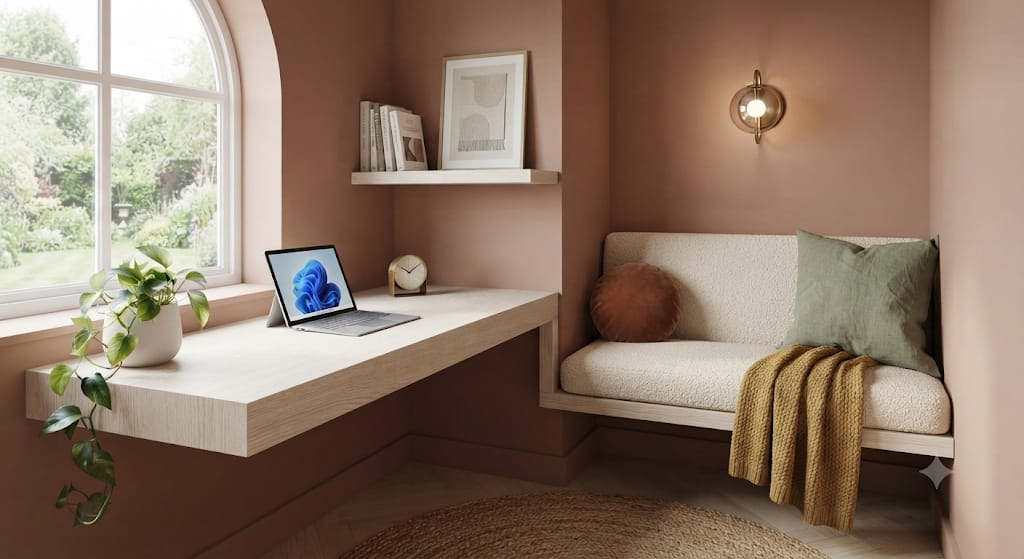
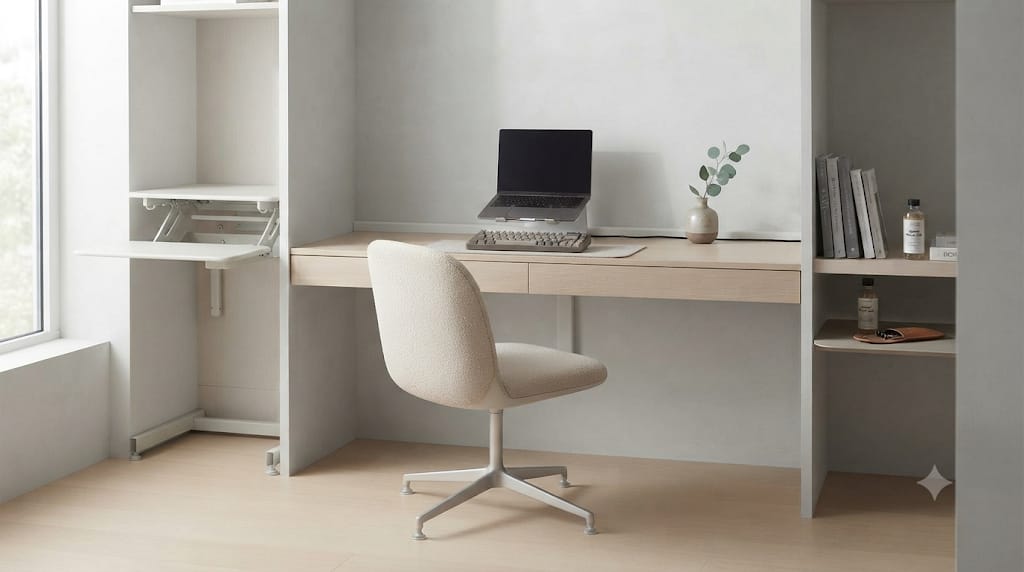
The modern workspace has transformed into an environment where personal identity, ergonomics, and aesthetic intentionality intersect. As professionals spend long hours sitting before high-resolution monitors, mechanical keyboards, and streamlined aluminum stands, the surrounding physical objects play a critical role in shaping focus and reducing digital burnout. Among the various decorative and functional accessories available for high-end desk setups, few items capture attention as effortlessly as a retro Nixie tube desk clock.
A Nixie tube clock represents a fascinating intersection between mid-century cold-cathode physics and contemporary desk culture. Delivering a warm, biological orange glow that cannot be replicated by standard liquid crystal displays or LED backlights, these timepieces provide a tactile, analog presence in a world dominated by flat digital screens. Integrating a retro Nixie tube clock into a modern home office introduces a timeless statement piece that honors early computing history while grounding the workspace in a sophisticated, ambient warmth.
1.1 The History and Science of Gas-Discharge Neon Display Tubes
To understand the enduring appeal of Nixie tubes, one must first appreciate the engineering required to produce them. Developed in the mid-1950s by the Burroughs Corporation, the Nixie tube—technically known as a cold-cathode gas-discharge indicator tube—served as the primary numeric display technology for high-end laboratory equipment, early digital computers, radar displays, and military instruments long before the invention of seven-segment LEDs.
A genuine Nixie tube consists of a sealed glass envelope filled with a low-pressure gas mixture, typically composed primarily of neon with small amounts of argon and mercury vapor. Suspended inside this gas envelope is a fine wire mesh anode alongside ten individual metal cathodes shaped into numerals from zero through nine. When a high voltage—typically around 170 volts DC—is applied between the anode grid and a chosen numeric cathode, the gas immediately surrounding that specific metal numeral ionizes. This process creates a brilliant, soft neon glow via glowing plasma. Because each metal digit is stacked physically behind the next inside the glass tube, the numbers jump back and forth in three-dimensional space as time ticks forward, giving the clock a dynamic, sculptural depth that flat electronic displays lack.
1.2 Authentic Vintage Nixie Tubes versus IPS LCD Digital Simulation Clocks
As demand for retro timepieces has surged across home office setups, the market has split into two primary product categories: authentic cold-cathode gas-discharge clocks and modern IPS LCD simulation clocks. Choosing the right option depends entirely on your aesthetic preferences, budget, and tolerance for vintage hardware maintenance.
Authentic Nixie tube clocks utilize real, New Old Stock (NOS) vintage tubes manufactured during the Cold War era—primarily Soviet-era tubes like the IN-14, IN-18, or ZIN-18—or rare hand-crafted modern tubes produced by boutique artisans. These clocks deliver genuine gas ionization, complete with the subtle flicker, warm amber hue, and physical metal wire mesh inherent to true cold-cathode hardware. However, true tubes operate under high internal voltages, generate mild thermal output, and possess a finite operational lifespan, requiring periodic digit-cycling routines to maintain internal gas distribution.
Conversely, IPS LCD simulation clocks—popularized by modern tech brands—replace the gas-filled tube with small, high-density IPS screen panels encased within quartz glass tubes. These digital smart clocks emulate the visual appearance of classic Nixie digits while offering massive customization. Users can switch between dozens of retro font styles, project custom images, display real-time weather metrics, and synchronize dynamic RGB background lighting under each tube. While an IPS clock lacks the physical cathode stack and authentic neon plasma of a true gas tube, it offers absolute reliability, lower power consumption, total customization, and zero risk of physical tube burnout.
1.3 Why Retro Timepieces Dominate High-End Workspace and Productivity Culture
The presence of a retro clock in a contemporary home office provides a deliberate psychological counterweight to screen fatigue. Throughout a typical workday, our eyes are locked onto high-density pixel grids rendering spreadsheets, code editors, communication apps, and video meetings. This environment can cause visual overstimulation and a sense of detachment from physical reality.
A Nixie tube desk clock introduces a warm, slow-paced aesthetic anchor. The soft ambient radiance of glowing neon operates at a color frequency that does not induce blue-light optical strain or suppress melatonin during late-night work sessions. Furthermore, watching physical numbers shift within transparent glass tubes introduces a micro-moment of mindfulness—a reminder of passing time rendered through physical light rather than intrusive software notifications. On a desk featuring sleek dark aluminum, warm natural wood, or frosted acrylic accessories, a Nixie timepiece acts as an immediate focal point, elevating the entire room’s visual identity.

2. Key Technical and Material Specifications to Evaluate Before Purchasing
Selecting the ideal retro clock for your desk setup requires examining technical components, chassis engineering, power design, and smart connectivity. Because prices for quality clocks range from mid-tier options to handmade luxury artifacts, evaluating core engineering specifications ensures long-term performance and satisfaction.
2.1 Genuine Cold-Cathode Tube Architecture and Cathode Poisoning Prevention
For those pursuing an authentic gas-discharge clock, the provenance and health of the tubes are paramount. Most vintage clocks rely on Soviet NOS tubes such as the IN-14 or the larger IN-18. The IN-14 is widely praised for its compact footprint and distinct retro character, featuring fine metal cathode wires and a classic Soviet numeral typeface. The IN-18 and specialized modern equivalents like the ZIN70 feature much larger glass envelopes and taller numerals, creating an unmistakable statement piece visible from across a room.
A crucial feature in any authentic Nixie clock is an automated cathode poisoning prevention routine. Cathode poisoning occurs when a specific digit remains illuminated for extended periods without change (for example, the leading tens-of-hours digit on a 12-hour display). Over time, sputtering metal deposits from active cathodes coat inactive adjacent numerals, causing uneven illumination or dead spots. Premium clock firmware prevents this by running a rapid slot-machine style cycling effect—sweeping every digit from zero to nine across all tubes at scheduled intervals or during off-hours—to cleanse the cathode surfaces and extend overall tube lifespan beyond 50,000 operational hours.
2.2 Modern Microcontrollers, Wi-Fi Synchronization, and Real-Time Clock Accuracy
While the display technology may be vintage or retro-inspired, the internal electronic brain of a modern desk clock should be cutting-edge. Older or lower-quality DIY clock kits rely on simple quartz oscillators that drift by several seconds or minutes each month, requiring frustrating manual time adjustments.
Top-tier desk clocks incorporate high-precision Real-Time Clock (RTC) chips with temperature-compensated crystal oscillators (DS3231 or equivalent) that maintain extreme timekeeping precision even during ambient temperature shifts. Furthermore, premium modern iterations integrate Wi-Fi microcontrollers (such as ESP32 chips), allowing the clock to connect to your local wireless network. Once connected, the clock automatically queries atomic Network Time Protocol (NTP) servers, guaranteeing that your desk clock remains accurate to the exact second year-round while automatically adjusting for daylight saving time transitions without manual intervention.
2.3 Base Chassis Materials: CNC Anodized Aluminum, North American Walnut, and Acrylic
The chassis housing the electronic driver boards and glass tubes establishes how well the clock integrates with your specific desk aesthetic. Manufacturers utilize three primary material categories for clock bases:
- CNC Machined Anodized Aluminum: Milled from single blocks of solid aluminum alloy and finished with matte sandblasting or anodization, these bases offer substantial physical weight, pristine chamfered edges, and a clean metallic texture. They pair seamlessly with Apple hardware, dark aluminum monitor arms, and minimalist black desk pads.
- Solid Hardwoods (Walnut, Cherry, or Oak): Precision-milled from natural timber and finished with natural oils or hard-wax finishes, wood bases introduce rich grain patterns and organic warmth. A North American walnut base offers a deep, luxurious contrast against glowing orange tubes, matching custom wood desk tops, leather accessories, and mid-century modern furniture.
- Transparent Acrylic and Polycarbonate: Ideal for industrial, cyberpunk, or maker-inspired spaces, clear acrylic bases leave the internal circuit board, solder points, copper traces, and surface-mount components fully exposed. Modern variations feature flame-polished edges that catch and diffuse under-tube RGB illumination.
2.4 Power Supply Efficiency, USB-C Connectivity, and Low-Voltage Safety
Legacy Nixie clocks often required bulky, proprietary AC wall transformers that added cable clutter to the desk area. Modern high-performance clocks utilize standardized USB-C power input operating at 5V/1A or 5V/2A. This allows users to power the clock directly from a monitor’s built-in USB hub, an under-desk power strip, or a clean desktop charging station using custom braided cables.
Internal voltage management is equally important. True Nixie tubes require approximately 170V DC to strike neon gas plasma. High-quality clocks incorporate ultra-compact, high-efficiency step-up DC-DC converters on the main board. These converters step up safe 5V USB power to the required high voltage within an isolated, fully shielded circuit loop, ensuring silent operation free of electrical hum or high-frequency coil whine that could disrupt a quiet office environment.

3. Top Retro Nixie Tube Desk Clock Archetypes for Modern Home Offices
Desk setups vary dramatically in their design themes, ranging from warm Scandinavian woodwork to dark cyberpunk aesthetics and clean minimalist spaces. Understanding the distinct product archetypes helps narrow down the perfect clock for your workspace layout.
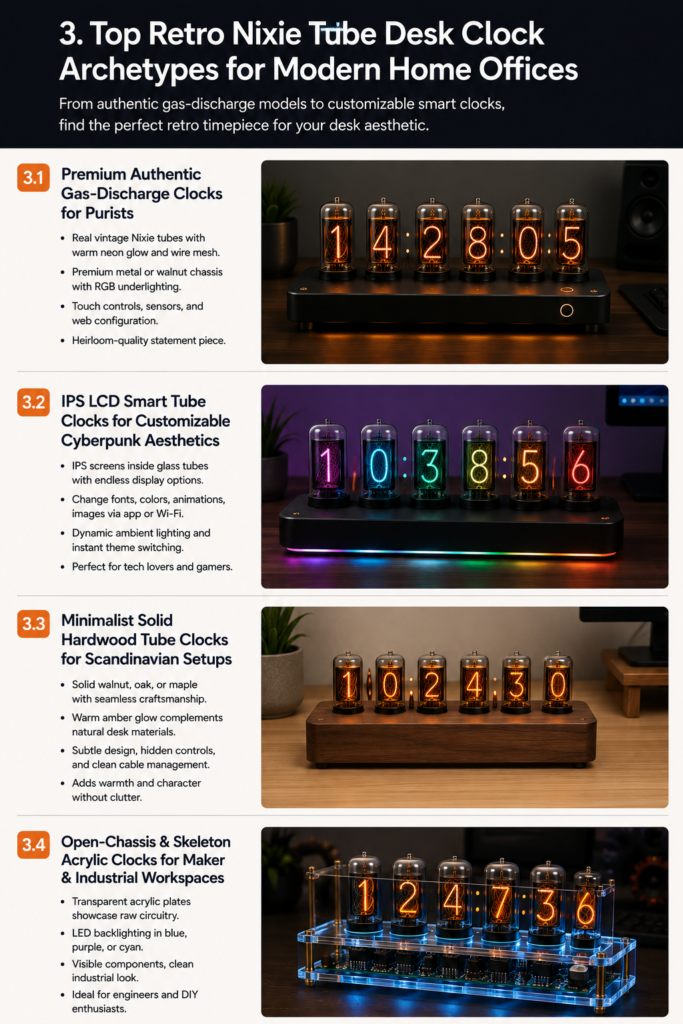
3.1 Premium Authentic Gas-Discharge Clocks for Cold-Cathode Purists
For desk enthusiasts who refuse to compromise on authenticity, genuine cold-cathode gas-discharge clocks remain the ultimate choice. These clocks showcase real Soviet-era NOS tubes or modern artisan-crafted glass envelopes, offering a soft glow and internal wire mesh details.
Flagship models in this category feature heavy CNC-machined metal or solid walnut enclosures equipped with integrated RGB backlighting under the tube sockets. Users can set the under-lighting to cast a subtle warm white or deep amber ambient wash onto the chassis surface, enhancing the primary neon orange digits above. These clocks often include touch-capacitive sensors built into the metal chassis for mode switching, integrated temperature sensors, and web-based configuration portals accessible via smartphone or computer web browser. While representing a higher financial investment, an authentic gas-discharge clock serves as an heirloom-quality focal point on any executive or creative desk.
3.2 IPS LCD Smart Tube Clocks for Customizable Cyberpunk and Modern Aesthetics
For workspaces centered around custom lighting, high-refresh-rate displays, and tech accessories, IPS LCD smart tube clocks offer unparalleled flexibility. By placing vibrant IPS screens inside quartz glass cylinders, these devices combine the silhouette of classic vacuum tubes with modern screen capabilities.
The primary strength of this archetype lies in software versatility. Through smartphone apps or onboard Wi-Fi control panels, users can toggle between dozens of display modes: classic orange Soviet font styles, matrix green digital code drops, vibrant rainbow gradients, cyberpunk neon numerals, or minimalist sans-serif typography. Advanced models allow uploading custom bitmap images or personal photos to display across the six individual glass tubes. With zero risk of cathode degradation, built-in dynamic ambient lighting, and instant theme switching, IPS smart clocks are ideal for tech lovers who enjoy regularly refreshing their desk aesthetic.
3.3 Minimalist Solid Hardwood Tube Clocks for Warm Scandinavian Desk Setups
Scandinavian and warm minimalist setups prioritize natural textures, organic light, soft matte finishes, and clutter-free surfaces. In these environments, sharp industrial metal or high-gloss plastics can feel harsh or out of place.
Hardwood tube clocks solve this design challenge by housing the display inside a seamless block of solid walnut, oak, or maple. The warm grain of North American walnut pairs naturally with soft leather desk mats, felt wool keyboard pads, and natural wood monitor stands. Whether utilizing genuine compact tubes or subtle LED-simulated light pipes, these clocks emphasize warm amber lighting that complements natural desk materials. With understated branding, hidden control buttons, and clean cable routing, a wooden retro clock adds personality without overwhelming surrounding decor.
3.4 Open-Chassis and Skeleton Acrylic Clocks for Maker and Industrial Workspaces
For software engineers, hardware designers, and DIY electronics enthusiasts, open-chassis skeleton clocks celebrate the beauty of raw circuitry. Featuring dual-layer transparent acrylic or clear polycarbonate plates held together by precision brass or stainless steel standoffs, these clocks leave every trace, capacitor, microcontroller, and resistor visible to the naked eye.
When powered, ambient LED backlight arrays reflect off the polished edges of the acrylic plates, illuminating the internal circuit board architecture in deep blue, purple, or cyan hues. This skeleton construction harmonizes with custom open-back headphones, custom mechanical keyboards with transparent keycaps, and exposed desk framing, turning the clock into a conversation-starting piece of functional desk art.
4. Strategic Desk Placement and Interior Integration Guidelines
Acquiring a high-end retro clock is only the first step; where and how you place the timepiece within your workspace directly impacts its visual effectiveness, readability, and integration with your broader room lighting scheme.
4.1 Harmonizing Warm Neon Illumination with Monitor Ambient Lighting
A common mistake in desk setup design is placing light sources with conflicting color temperatures directly next to one another. If your computer screen is calibrated to a cool 6,500K daylight white and your monitor lightbar casts a sharp cool beam across your desk pad, placing a 2,000K warm orange Nixie clock directly underneath the display panel can create visual friction.
To establish visual harmony, align the color temperature of your surrounding accent lights with the warm glow of the clock’s gas tubes. Configure your desk backlighting, LED lightstrips, or secondary ambient lamps to output warm white or amber hues (between 2,700K and 3,200K). Alternatively, if you utilize RGB accent lighting, select deep warm tones such as burnt orange, gold, or deep purple to complement the orange neon digits without washing out the internal cathode glow.
4.2 Spatial Placement: Monitor Risers, Side Credenzas, and Bookshelf Accent Zones
Because a retro clock serves as both a functional timepiece and a decorative accent, its height and angle relative to your primary seated position are important. Consider these three ideal placement locations:
- Directly Beneath the Primary Monitor on a Wooden Riser: Positioning a low-profile 6-tube clock centered on a monitor shelf creates a balanced focal point directly within your natural line of sight. This allows you to check the time instantly without turning your head away from your primary workflow.
- Flanking the Main Desk on a Side Credenza or Audio Rack: Placing the clock on an adjacent side table or audio interface rack separates timekeeping from your primary screen field, reducing visual clutter around your keyboard area while maintaining a cozy peripheral glow.
- Background Bookshelf Integration for Video Calls: If you participate in frequent video conference calls or stream content, placing a high-contrast Nixie clock on a background shelf behind your seating position adds depth, warm ambient lighting, and a unique focal point to your camera framing.
4.3 Cable Management and Power Routing for Clean Desk Photography
Exposed black power cables drooping across a clean desk surface ruin the aesthetic appeal of a premium timepiece. Achieving a floating, wireless appearance requires strategic cable management planning:
- Utilize Custom Right-Angle Braided USB-C Cables: Standard straight USB cable boots often stick out far from the rear or side chassis of a clock. Replacing them with slim, 90-degree right-angle USB-C cables allows the cord to drop vertically down the back edge of your desk shelf or monitor stand.
- Route Cables Through Desk Shelf Pass-Throughs: If your monitor riser includes cable management slots or routed pass-throughs, feed the power cable directly underneath the wooden shelf, securing it with adhesive wire clips.
- Match Cable Sleeving to Desk Wall Surfaces: Match the color of your braided USB power cord to your wall surface or desk pad color (e.g., light gray sleeve against light walls, matte black sleeve against dark wood) to make power lines practically invisible in desk photos.

5. Long-Term Maintenance, Tube Care, and Firmware Optimization
To ensure your retro clock maintains its visual appeal, accuracy, and performance over years of daily operation, follow systematic maintenance and configuration routines.
5.1 Extending the Operating Lifespan of Vintage Soviet and European Tubes
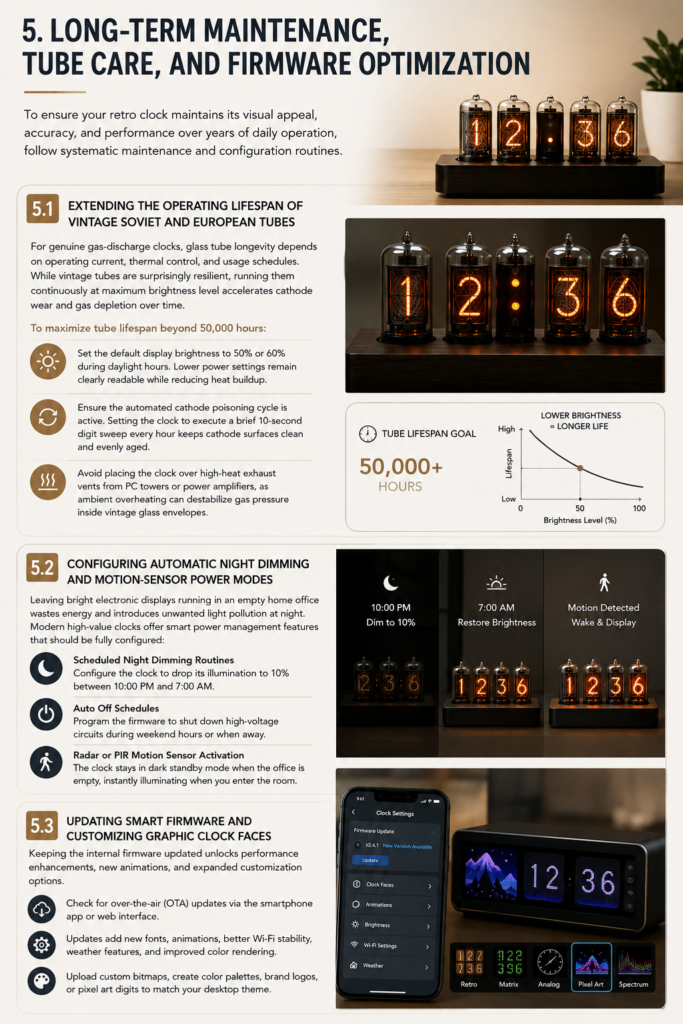
For genuine gas-discharge clocks, glass tube longevity depends on operating current, thermal control, and usage schedules. While vintage tubes are surprisingly resilient, running them continuously at maximum brightness level accelerates cathode wear and gas depletion over time.
To maximize tube lifespan beyond 50,000 hours:
- Set the default display brightness to 50% or 60% during daylight hours. Because neon gas plasma glows brightly in indoor environments, lower power settings remain clearly readable while drastically reducing heat buildup.
- Ensure the automated cathode poisoning cycle is active in your clock’s configuration menu. Setting the clock to execute a brief 10-second digit sweep every hour keeps all internal cathode surfaces clean and evenly aged.
- Avoid placing the clock directly over high-heat exhaust vents from desktop PC towers or power amplifiers, as ambient overheating can destabilize gas pressure inside vintage glass envelopes.
5.2 Configuring Automatic Night Dimming and Motion-Sensor Power Modes
Leaving bright electronic displays running in an empty home office wastes energy and introduces unwanted light pollution into your living space at night. Modern high-value clocks offer smart power management features that should be fully configured upon initial setup:
- Scheduled Night Dimming Routines: Configure the clock to drop its illumination to 10% brightness between 10:00 PM and 7:00 AM, providing a soft nightlight effect that never distracts during off-hours.
- Auto Off Schedules: Program the firmware to shut down gas tube high-voltage circuits entirely during weekend hours or periods when you are away from the office.
- Radar or PIR Motion Sensor Activation: Advanced clocks incorporate microwave radar or passive infrared (PIR) motion sensors within the base chassis. The clock remains in dark standby mode when the office is empty, instantly illuminating the display the moment you enter the room or sit down at your desk.
5.3 Updating Smart Firmware and Customizing Graphic Clock Faces
If you select an IPS LCD smart tube clock, keeping the internal firmware updated unlocks performance enhancements, new animations, and expanded customization options.
Periodically connect your clock to its companion smartphone app or local web management interface to check for over-the-air (OTA) software updates. Firmware updates frequently add new font styles, improved Wi-Fi reconnect stability, expanded weather reporting features, and refined color rendering modes. Take time to experiment with custom bitmap uploads—creating personalized color palettes, brand logos, or specialized pixel art digits allows you to match your clock display directly with your desktop wallpaper or mechanical keyboard theme.
6. Final Recommendations for Building an Iconic Workspace Focal Point
Investing in the best retro Nixie tube desk clock for your modern home office setup is one of the most rewarding aesthetic upgrades you can make to your personal workspace. By bridging mid-century cold-cathode physics with contemporary desk ergonomics, a Nixie timepiece provides an analog anchor that enriches long working hours with timeless visual warmth.