In the modern landscape of remote work, executive leadership, and high-output creative production, the desk is no longer just a piece of furniture. It is an ecosystem. Over the last few years, our relationship with workspace design has undergone a drastic philosophical shift. We have moved past the era of cheap, disposable plastic accessories and entered a period of intentional, health-first curation.
For professionals managing complex workflows—developers tracking code across environments, day traders parsing real-time analytics, or creative directors balancing asset management and communication—the single-screen setup is a bottleneck. The dual-laptop or laptop-plus-monitor configuration has become the golden standard.
However, expanding your digital real estate introduces a physical challenge: clutter and physical strain.
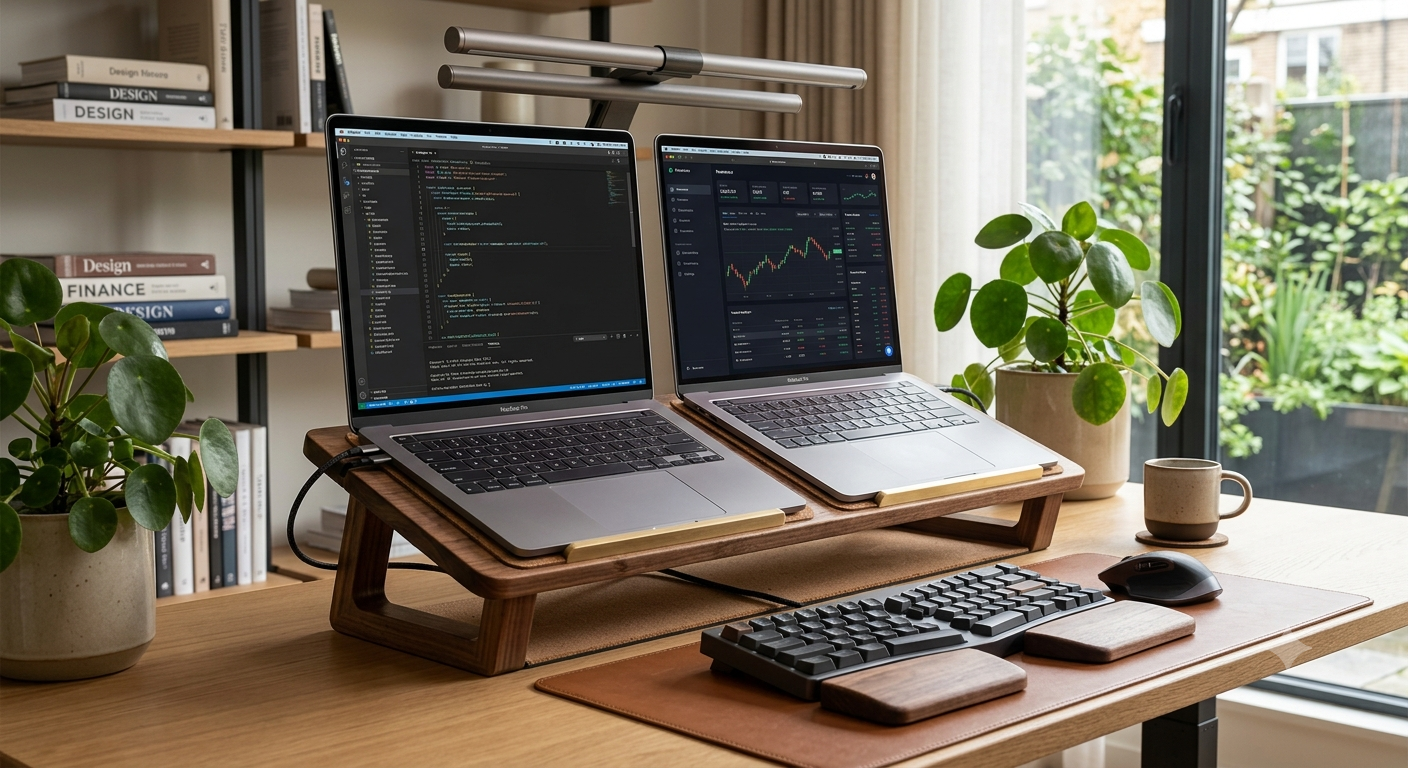
Enter the ergonomic solid wood dual laptop stand. This is not merely a utilitarian organizational tool; it is a premium intersection of biomechanical health, structural engineering, and high-end interior a esthetics. If you are looking to maximize your focus, protect your spinal health, and elevate your office into a space that inspires deep work, investing in a solid wood dual workstation stand is a definitive upgrade.1
1.
The Anatomy of Modern Workflow: The Rise of the Dual-Screen Professional

To understand why a dedicated dual laptop stand has become a high-value asset, we must look at how modern professionals actually work. The days of working exclusively out of a single browser tab are gone.
The Dual-Machine Split
Many corporate employees, freelancers, and consultants now balance two entirely separate ecosystems:
- The Corporate Machine: A heavily encrypted, restricted laptop dedicated entirely to company networks, VPNs, and internal communications.
1
- The Personal/Creative Machine: A high-performance laptop used for side ventures, freelance portfolios, rendering, or personal finance management.
2. The Biomechanics of Desk Work: Why Ergonomics Can No Longer Be Ignored

Working on a laptop flat on a desk surface is a biological ticking time bomb. Laptops are inherently anti-ergonomic because the keyboard and the screen are structurally linked. When the keyboard is at an optimal height for your wrists, the screen is too low, forcing your neck to bend downward.
This chronic forward head posture leads to tension headaches, shoulder impingement, lower back compensation, and long-term spinal disc degeneration.
The Dual-Angle Solution
An ergonomic dual laptop stand solves this by elevating both digital displays
simultaneously to eye level. The optimal ergonomic setup dictates that the top third of your laptop screens should sit exactly at eye level, allowing your gaze to rest naturally without dipping your chin. By alignment of two screens side-by-side at a uniform height and angle, the stand eliminates repetitive, asymmetrical neck rotation, distributing mechanical stress evenly across the musculoskeletal system.
3. Materials Science: The Unrivaled Superiority of Solid Wood

When shopping for workspace accessories, the market is flooded with cheap aluminum alloys, cold pressed sheet metal, and hollow plastics. While these materials are cheap to manufacture, they fail significantly in premium, long-term workspace environments.
Choosing a stand crafted from genuine, sustainably sourced solid wood—such as American Walnut, White Oak, or Maple—is a choice rooted in durability, acoustics, and psychology.
The Acoustic and Thermal Benefits of Wood
Beyond looks, wood possess natural structur
al properties that metal lacks:
Resonance Damping: Aluminum stands act as acoustic amplifiers. If your laptops have high-RPM internal cooling fans, a metal stand can rattle or amplify the hum via conduction against your desk. Solid wood is incredibly dense and porous on a microscopic level; it absorbs micro-vibrations, resulting in a noticeably quieter workspace.
Thermal Regulation: Metal stands absorb ambient heat or cold rapidly. Wood maintains a stable, neutral temperature, meaning it won’t shock your wrists if you brush against it, nor will it warp or degrade under the heavy thermal output of high-end processing laptops. 4. Design Archetypes: Horizontal Side-by-Side vs. Vertical Docking
When selecting a dual laptop stand, you must analyze your specific processing and viewing habits. Solid wood dual stands generally fall into two architectural categories:
Type A: The Elevated Dual Display Stand (Active Use)
This design features a wide, beautifully sculpted solid wood platform mounted on premium steel or heavy wooden legs. It holds both laptops open, lifting them side-by-side or at a slight inward angle.
- Best for: Professionals who actively use both laptop screens, web cameras, or trackpads simultaneously.
- Ergonomic Impact: Gives you a massive, continuous horizontal workspace at perfect eye level.
Type B: The Vertical Closed-Clamshell Dual Slot (Passive Storage)
A masterclass in space saving, this archetype holds two laptops vertically in a closed position.
The laptops slot into precisely routed, felt-lined channels in a single, heavy block of solid wood.
- Best for: Power users who connect their laptops directly to large, external ultrawide monitors and use the laptops strictly as computing engines (clamshell mode).
- Ergonomic Impact: Frees up roughly 90\% of desk real estate, allowing you to position your external keyboard and mouse perfectly without clutter blocking your arms.
5. Pshological Productivity: The Biophilic Design Connection Why does a wooden workspace accessory make us feel better? The answer lies in biophilic design—the scientifically validated principle that incorporating natural elements into building and interior design reduces human stress and boosts cognitive performance.

Studies in environmental psychology demonstrate that viewing natural wood grains triggers an automatic, parasympathetic nervous system response in humans. It lowers heart rates, reduces cortisol levels, and induces a state of calm focus.
When your desk is dominated by cold gray aluminum and tangled wires, your brain registers subtle, chaotic environmental friction. Replacing that chaos with a beautifully oiled piece of solid wood grounding your main technology creates a tactile, premium anchor point. It shifts the psychology of your office from a stress-inducing “work cubicle” to a high-end, intentional “studio
6. Engineering Integrity: What to Look For in a Premium Stand
Because a dual laptop stand is tasked with cradling thousands of dollars worth of premium tech hardware, you must look for specific manufacturing indicators to ensure you are buying a high-value piece rather than a poorly routed imitation.
Grain Continuity: High-end stands are carved from single slabs of premium lumber or feature seamless book-matched joints. Avoid options made from cheap wood particles or low-grade laminate overlays that split and peel under humidity changes.
Premium Inner Linings: The channels or platforms where your laptops rest must be lined with premium protection. Look for genuine merino wool felt, top-grain leather, or highdensity silicone padding. This ensures your anodized laptop chassis never suffers scratches or friction wear.
Weighted Anti-Slip Base: A dual stand carries an off-center center of gravity when you pull one machine out. The base should feature integrated cork pads or weighted brass inserts to keep it completely stationary when you dock or undock your machines.
Integrated Cable Routing: High-value designs incorporate hidden channels or rear cutouts to pass charging bricks and data cables cleanly underneath, hiding ugly cord clutter from your direct line of sight.
7. Curing the Setup: How to Build the Perfect Aesthetic Composition
Owning a premium solid wood dual stand is only half the battle; you need to integrate it into your desk environment properly to fully maximize its value.
The Desk Surface Match: If you have an oak desk, try contrast. A dark walnut dual stand creates a striking, sophisticated focal point on a lighter wood desk. Alternatively, matching the exact wood species creates a unified, custom-built look.
Peripherals Integration: To respect the ergonomics of an elevated stand, you must use a dedicated external keyboard and mouse. Look for peripherals that feature wooden accents or minimalist matte finishes to keep the aesthetic clean.
Lighting Dynamics: Position a high-quality desk monitor light bar or a warm architectural lamp nearby. When warm light hits the hand-rubbed oil finish of a solid wood stand, it accentuates the depth of the natural wood grain, making your entire office setup look incredibly premium during evening work sessions.
Final Verdict: An Investment in Longevity and Health
An ergonomic solid wood dual laptop stand is far more than a simple desk riser. It is an intentional investment in your physical health, your daily cognitive focus, and the overall design value of your home or professional office. By lifting your devices, you structurally protect your neck and spine, clear your mental space from chaotic clutter, and bring the grounding beauty of nature directly into your digital workflow.
Stop settling for cheap plastic and cold metal to support your most critical professional tools. Elevate your machines, protect your body, and build a workspace that truly matches your ambitions.